


















.svg.png?height=48&name=Zoho_CRM_(application).svg.png)





.webp?length=1248&name=5%20-%20Best%20cash%20flow%20forecasting%20software%20for%20Xero%20(1).webp)
Xero makes it easy to see what's owed, but not to know when that money will actually land. That's because its cash flow view runs on invoice due dates, instead of on how each customer actually pays.
An invoice due in 30 days is treated the same whether that customer has a habit of paying on day 30 or day 60, so the forecast assumes a version of your customer base that doesn't exist.
For an AR team, that gap shows up the same way no matter how you try to close it inside Xero:
- A spreadsheet built from a Xero aging export models against due dates, not payers, and is stale the moment you present it, because nothing updates it between pulls.
- Xero's native cash flow view, or a bolt-on forecasting add-on, still projects from due dates, so it is only as accurate as the share of customers who pay on time, which the data below shows is a minority.
- A dedicated FP&A tool adds scenario modeling on top of the ledger but stays read-only against the receivable underneath. It can chart the late-payment pattern in detail, but it cannot close it.
Most finance teams turn to Xero integrations to close that gap. But while a number of platforms connect to Xero and produce a forecast, their approach to forecasting differs, and that difference is what decides your result.
Is it reading the same due dates Xero already showed you, or is it built on how your customers pay? When it puts a forecast in front of you, can you see how each number was reached, or are you asked to trust a figure with no working behind it? And when it spots a payer drifting late, does it do anything about it, or just show you a more detailed version of the problem you already had?
You’d find answers to some of these key questions in this review of 6 Xero integrations for cash flow forecasting.
6 cash flow forecasting tools for Xero compared by their approach to forecasting
The table below gives a fast read of the tools in this review, while the profiles that follow go deeper.
|
Tool |
Best for |
Forecasting approach |
User rating |
|---|---|---|---|
|
Chaser |
Mid-market B2B finance teams wanting a forecast built on payment behavior, backed by a debt recovery route |
Models and acts: forecast is built on live AR and collections data it also acts on |
4.3/5 on G2 (69 reviews) |
|
ezyCollect |
Trade and wholesale B2B teams (notably AU/NZ) wanting automated collections paired with live credit risk screening |
Acts: automated chasing plus illion-backed credit risk; no named cash flow forecasting feature |
4.7/5 on G2 (25 reviews) |
|
Kolleno |
Mid-market and enterprise finance teams wanting collections, invoicing, payments, and reconciliation run by a full team on one platform |
Models and acts: projected cash inflow dashboards built on its own reconciliation and collections data |
4.9/5 on G2 (107 reviews) |
|
Paidnice |
Small and mid-market Xero/QuickBooks teams wanting published pricing and built-in enforcement |
Acts: enforcement-led (automatic late fees, interest, statements); cash flow visibility is a supporting feature |
4.8/5 on G2 (13 reviews) |
|
Invoiced |
Medium to enterprise B2B teams wanting billing, collections, and forecasting bundled with broad ERP reach beyond Xero |
Models and acts: named rolling forecasts and at-risk-customer prediction built on its own billing, collections, and cash application data |
4.5/5 on G2 (414 reviews) |
|
Upflow |
Scaling B2B and SaaS companies wanting the most analytics-led AR dashboards, including a named cash-forecast view |
Models and acts: named "cash forecasts" inside its analytics dashboard, alongside automated collections workflows |
4.8/5 on G2 (233 reviews) |
1. Chaser
Best for: Mid-market B2B finance teams wanting a cash flow forecast built on customer payment behavior, backed by a no-win-no-fee debt recovery route.
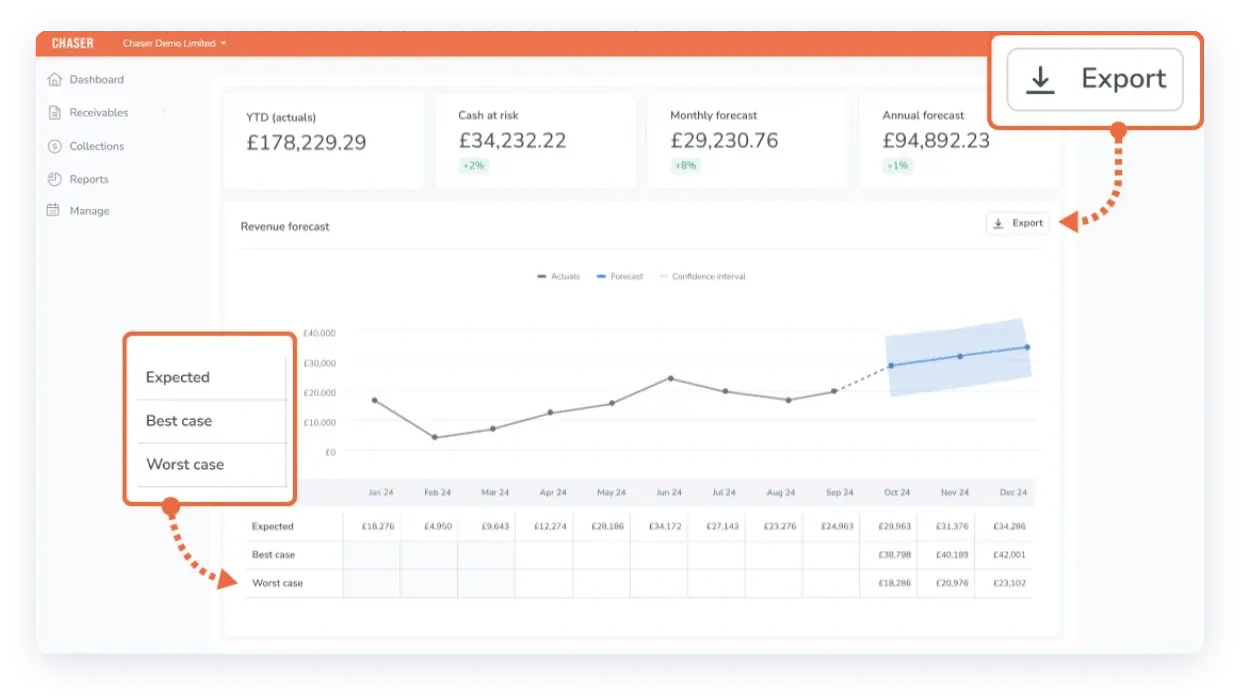
Chaser is an AR automation and cash flow forecasting platform that makes it easy for a finance team on Xero to see when cash will actually land, without second guessing the data. It connects to your Xero account through Xero’s own REST API, syncing daily and again right before each round of chasing, ensuring the forecast reflects your live receivables rather than a snapshot from the last export.
From there, you can automatically chase customers most likely to pay late across email, SMS, letters, and automated calls. This makes it possible to bring that cash in sooner and keep the forecast self-correcting as payments land.
Other Xero forecasting integrations read the same invoice due dates Xero already shows you, which is why their forecasts assume a customer base that pays to terms. Chaser’s is built on how each account has actually paid, so it reflects the customer base you really have rather than an idealized one.
Cash flow forecasting built on live receivables
Xero’s cash flow forecast draws on the same receivables pipeline its collections engine is already acting on, rather than reading your Xero ledger cold. Because Chaser already knows which of your invoices are overdue, which customers consistently pay late, and which accounts are at risk, your forecast reflects behavior rather than payment terms. A customer who reliably settles at 50 days on Net 30 terms is forecast at 50 days, not 30.
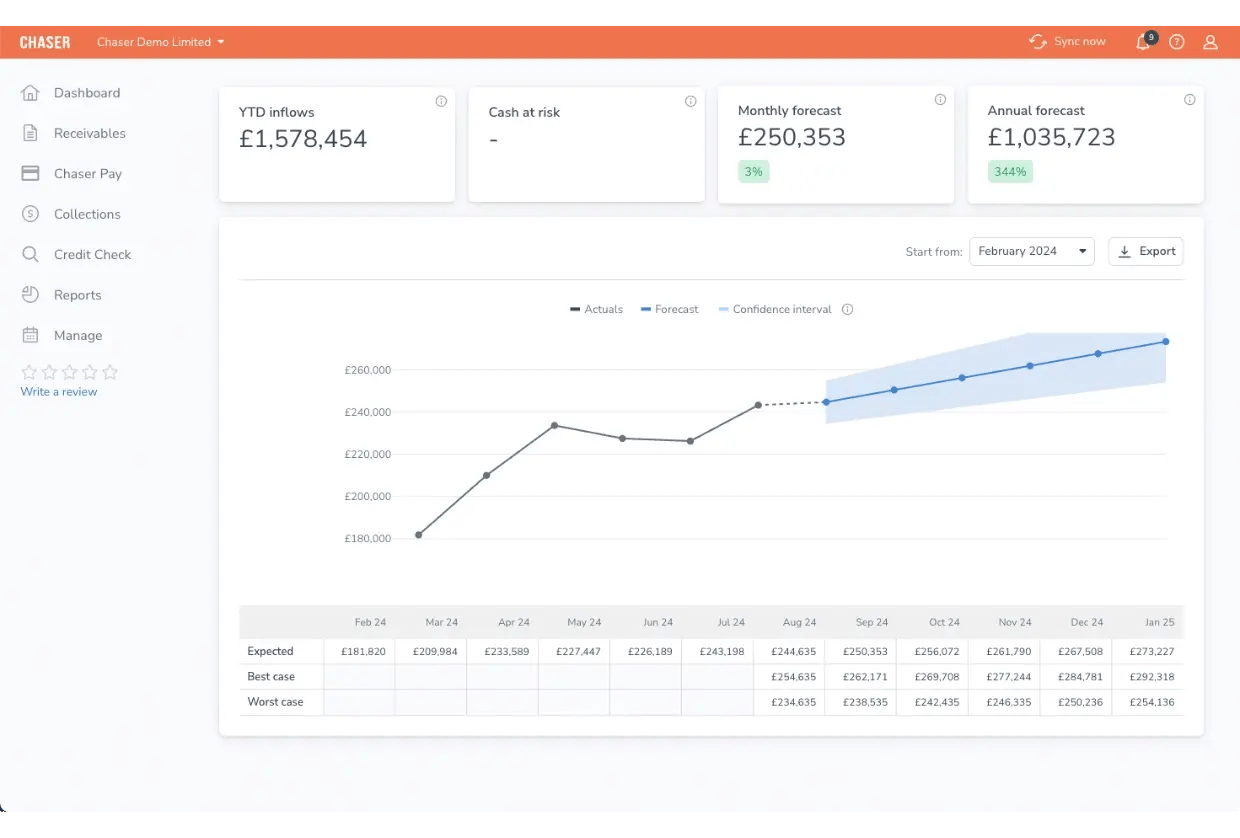
That is what lets your forecast improve cycle over cycle instead of staying fixed to whatever the ledger said on the day it ran. Actual payments update the projection in place of static assumptions, and custom rules and overrides handle the context the model cannot see on its own, including resetting a customer’s Payer Rating when you know something its payment history does not yet show. The horizon runs weeks to months rather than a single snapshot, and it’s available for Xero and AccountsIQ.
Because the forecast is assembled from your live receivables rather than a separate model layered on top of them, each figure traces back to the specific invoices and payer behavior behind it, so you can see how a number was reached instead of being asked to trust it. It reconciles to the same receivables you can already check in Xero and refreshes on each daily sync and again before each round of chasing, so the forecast stays anchored to numbers you can verify rather than a stale snapshot.
The receivables forecast is the mechanism behind the incoming-cash line, and it sits alongside Chaser’s wider revenue forecast suite.
Risks flagged before invoices go overdue
Xero's aging report tells a finance team that invoices are already overdue, but it has no way to flag which of this month's invoices are heading that way, because it treats every customer the same regardless of how they have actually paid before. The Late Payment Predictor flags invoices at risk of late payment ahead of the due date, using invoice value, due date, and the customer’s payment history.
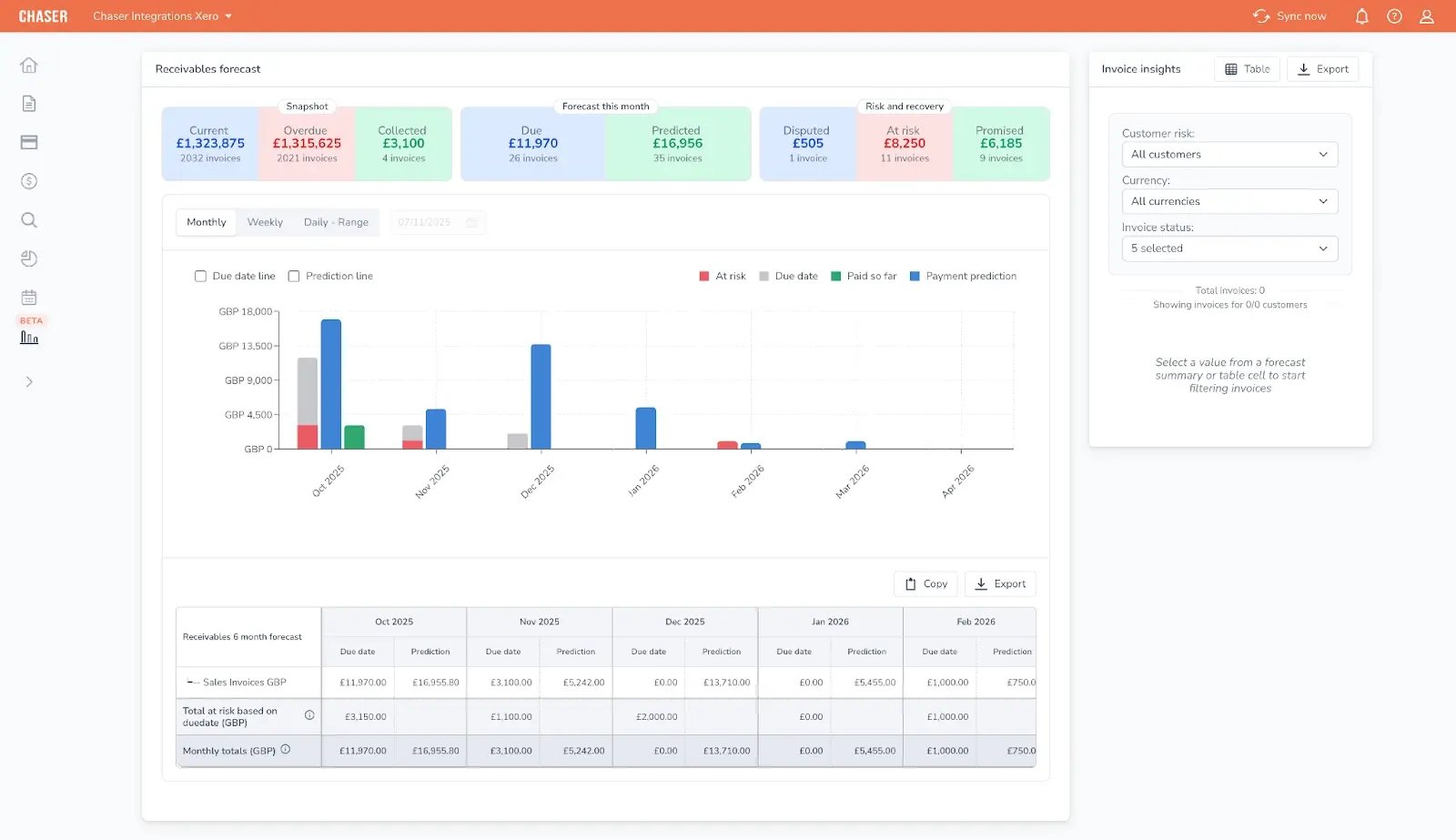
Payer Rating classifies each customer as a good, average, or bad payer based on that same behavior. Together, you aren’t waiting for an invoice to age into a problem before doing anything about it. They assist teams in lowering days sales outstanding (DSO) before overdue invoices become a serious issue.
No-win-no-fee recovery when chasing alone doesn't work
Once automated chasing has run its course on an invoice, Xero itself has no next step. The invoice just keeps sitting in the aged receivables report, and your options are to keep chasing manually, write the balance off, or start a separate process with an outside collections agency. When that happens, Chaser Collections takes over on a no-win-no-fee basis. Collections activity runs under your own brand voice, with full visibility inside the Chaser platform.
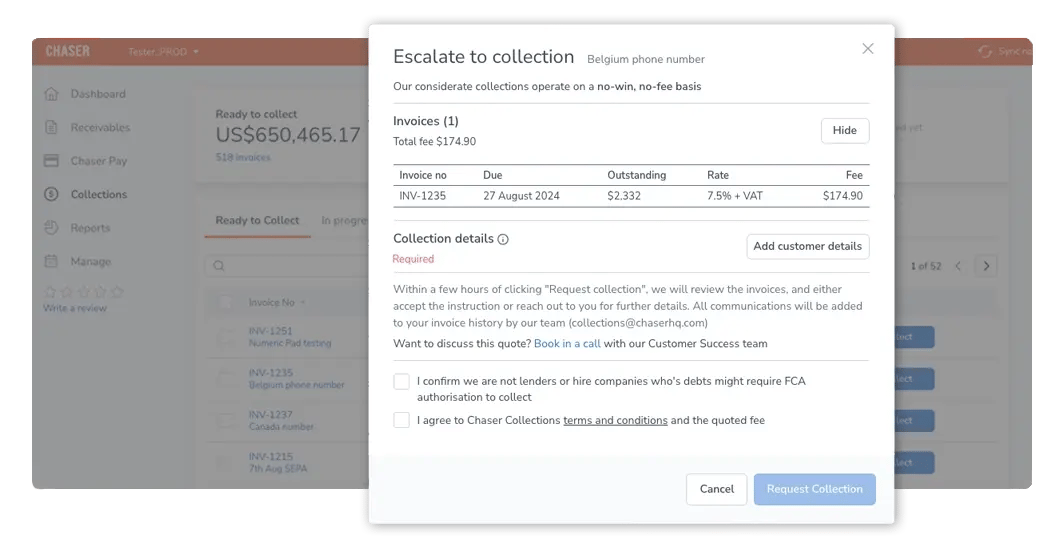
For a mid-market team whose forecast keeps breaking on late-paying customers, instead of stale "at risk" invoices pulling your forecast further from reality every cycle, each flagged invoice moves through a defined resolution path, so your forecast keeps reflecting what is actually collectible.
Key features
- Cash Flow Forecast: projects incoming cash weeks to months ahead, built on customer payment behavior rather than invoice terms, for Xero and AccountsIQ.
- Receivables Forecast: the mechanism behind that projection, modeling when each invoice is actually likely to be paid.
- Revenue Forecast: models best-case, expected, and worst-case revenue scenarios.
- Late Payment Predictor: flags invoices at risk of late payment ahead of the due date, using invoice value, due date, and payment history.
- Payer Rating: classifies each customer as a good, average, or bad payer based on payment history.
- Chaser Collections: no-win-no-fee debt recovery when automated chasing doesn’t resolve an invoice.
- Custom rules and overrides: adjusts the forecast for known exceptions without breaking the model.
- Automated multi-channel chasing: runs reminders across email, SMS, letters, and calls.
Pros
- Built on live receivables data it also acts on
- Every forecast figure breaks down into the invoices and payer behavior behind it, so the number is auditable instead of a black box
- Forecast accuracy improves as collections activity improves
- Early-warning signals sit inside the same workflow as the forecast
- No-win-no-fee debt recovery included when automated chasing doesn’t resolve an invoice
Cons
- Not built for multi-year FP&A modeling, full three-way statements, or multi-entity consolidation
- Cash flow forecast is currently available to Xero and AccountsIQ users only
- Not suited to project-based or subscription businesses without a receivables book
Pricing
Chaser publishes its pricing across multiple regions and currencies rather than requiring a sales call to get a number. Full details, including plan tiers, sit on the Chaser pricing page.
What users say
Chaser holds a 4.3/5 rating on G2 from 69 reviews, with reviewers most often citing the automation of email reminders, ease of setup, and measurable debtor-day improvements.
FHC Accountants & Business Advisors introduced Chaser to its client Docuflow, an Irish provider of print, mail, and document workflow services, and partner Francois van Heerden has credited the switch with getting Docuflow’s invoices paid 54 days faster.
Speak to a cash flow forecasting expert to find out what your forecast would look like once it reflects how your customers actually pay, and where Chaser Collections would step in on the accounts already dragging your numbers off track.

2. ezyCollect
Best for: Trade and wholesale B2B teams, notably across Australia and New Zealand, wanting automated collections paired with live credit risk screening.
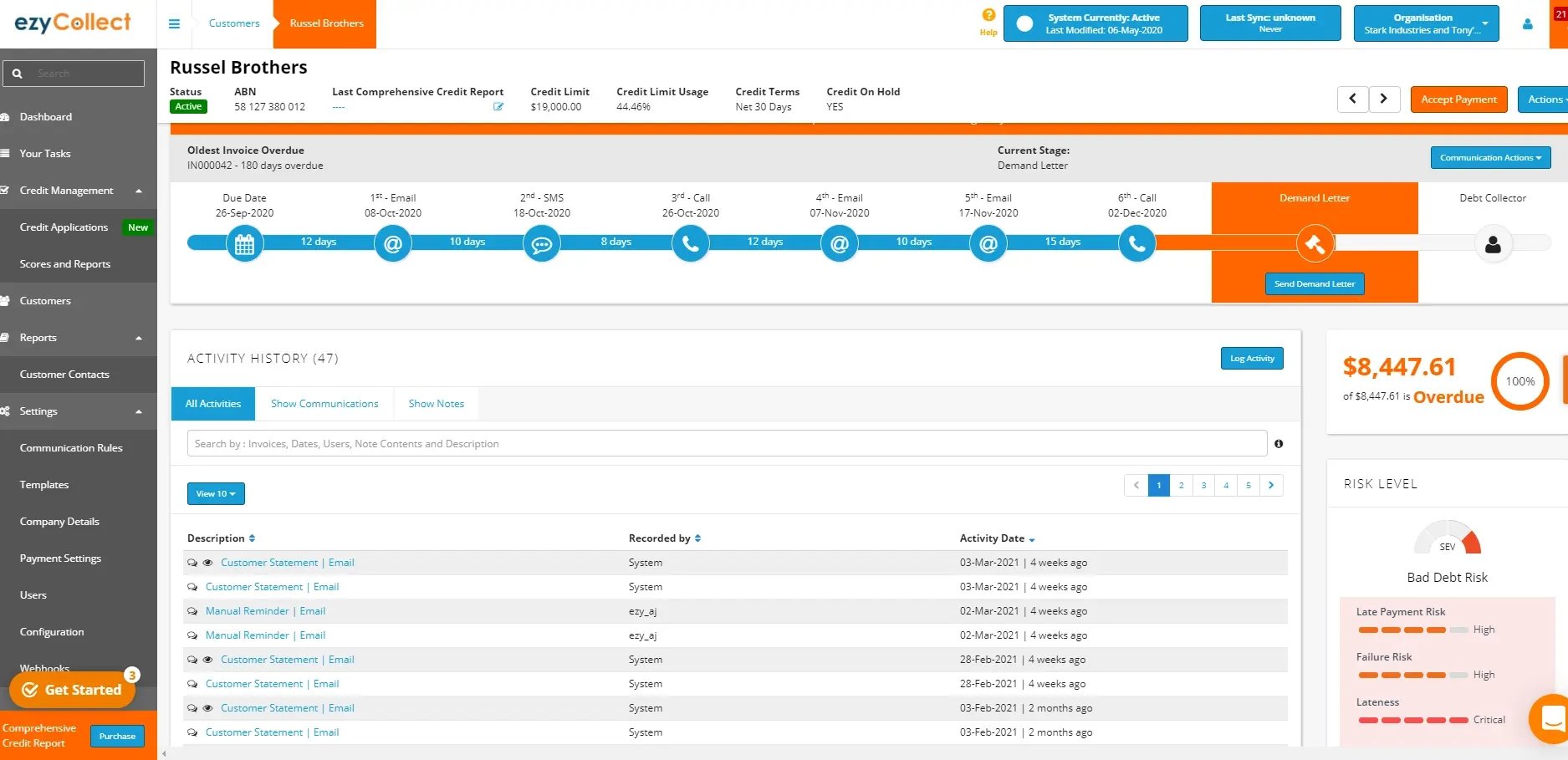
ezyCollect, now part of Sidetrade, connects to Xero through a dedicated integration that syncs invoices, contacts, and payment write-back, so a payment taken through ezyCollect’s portal is matched to the correct Xero invoice automatically.
ezyCollect acts on receivables rather than forecasting them as a named, separate capability. Its strength is automated multi-channel chasing paired with illion-backed credit risk scoring and a payment portal branded as SimplyPaid; cash flow improves as an outcome of faster collections.
Key features
- Automated email, SMS, and call reminders with payment write-back into Xero
- SimplyPaid customer payment portal for one-click payment
- Daily credit risk monitoring on every credit customer through illion
- Centralized communication and dispute history
Pros
- Credit risk screening and collections sit in one workflow, uncommon among Xero-connected tools at this scale
- G2’s review summary highlights the automation of reminders as consistently freeing up time previously spent on manual follow-up
- Reviewers describe the consolidated reminder approach, messaging customers only when genuinely overdue, as reducing customer friction compared to per-invoice reminder tools
- The writeback function that syncs invoice, statement, and payment details directly into the connected ERP is specifically praised by reviewers
Cons
- No named cash flow forecasting feature; a team wanting a modeled forward view of cash position would need to pair ezyCollect with a separate tool
- Built primarily around the Australia/New Zealand market, so integration depth and support coverage elsewhere can vary
- G2’s review summary notes the dashboard is the most common friction point reviewers mention, despite high overall satisfaction
Pricing
ezyCollect prices by the number of active debtors on a monthly plan, with implementation costs varying by ERP complexity.
What users say
ezyCollect holds a 4.7/5 rating on G2 from 25 reviews. Reviewers highlight the automation freeing up time to manage debtors by value and by days outstanding, with the SimplyPaid portal called out as a recurring strength.
3. Kolleno
Best for: Mid-market and enterprise finance teams wanting collections, invoicing, payments, and reconciliation run by a full team on one platform.
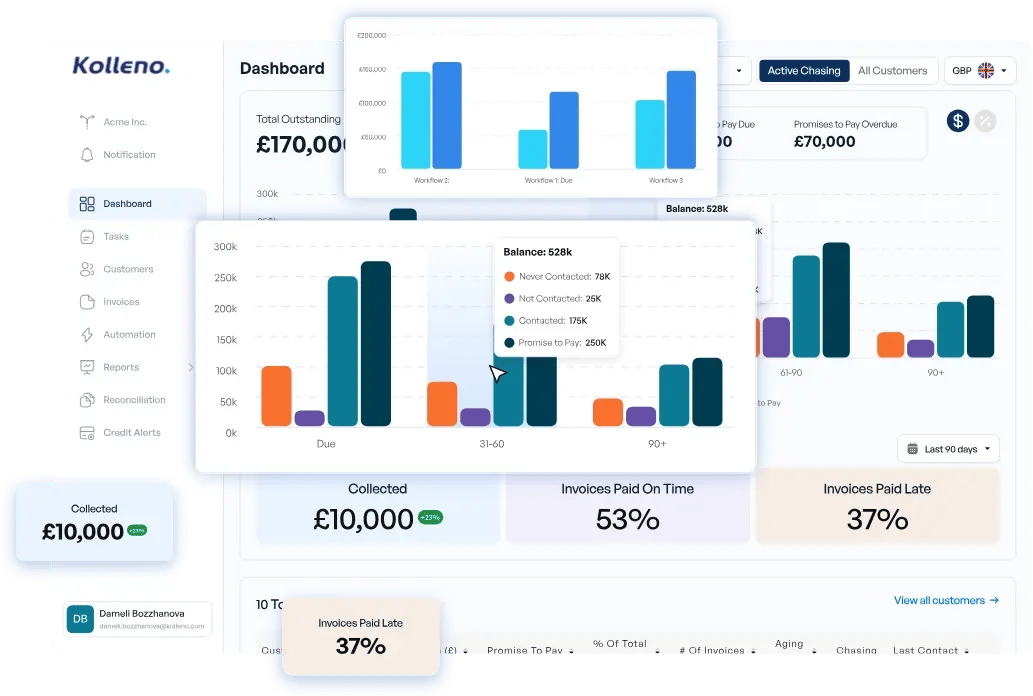
Kolleno is an official Xero App Store connected app, syncing customer and invoice data on a near-real-time basis, and it also integrates directly with NetSuite and Microsoft Dynamics 365 Business Central.
Kolleno models and acts. It runs its own AI-assisted collections and reconciliation engine, and its dashboards give visibility into projected cash inflows, overdue balances, and upcoming cash outflows built from that same reconciled data. Of the five non-Chaser tools in this comparison, Kolleno sits closest to Chaser on the models-and-acts axis, though its forecast isn’t tied to AR-specific behavioral signals, like payer ratings, the way Chaser’s is.
Key features
- AI-assisted collections workflows with drag-and-drop rule building
- Customer payments portal supporting multiple currencies and payment methods
- Automatic payment reconciliation across Xero and connected ERPs
- Task management that assigns follow-up actions by client portfolio or region
Pros
- Highest G2 rating in this comparison, with reviewers frequently citing the customer support team and speed of implementation
- Runs its own collections and reconciliation engine, so cash inflow dashboards draw on the same data already powering collections
- Reviewers frequently cite ERP integrations, including NetSuite, as straightforward to set up
- Several reviewers describe moving off manual, spreadsheet-based AR tracking entirely after adoption
Cons
- Pricing runs at a premium relative to most of the other tools here, positioning Kolleno toward mid-market and enterprise budgets rather than smaller teams
- Reporting customization is a recurring theme in reviewer feedback, with several wanting more flexibility in the reporting suite
- A few reviewers note the interface takes some learning without dedicated onboarding support
Pricing
Kolleno’s pricing is quote-based, scaled to team size and feature needs.
What users say
Kolleno holds a 4.9/5 rating on G2 from 107 reviews, the highest of the six tools compared here. Reviewers most often cite collections efficiency, time saved on manual follow-up, and the quality of onboarding support.
4. Paidnice
Best for: Small and mid-market teams on Xero or QuickBooks Online wanting published pricing and built-in enforcement.
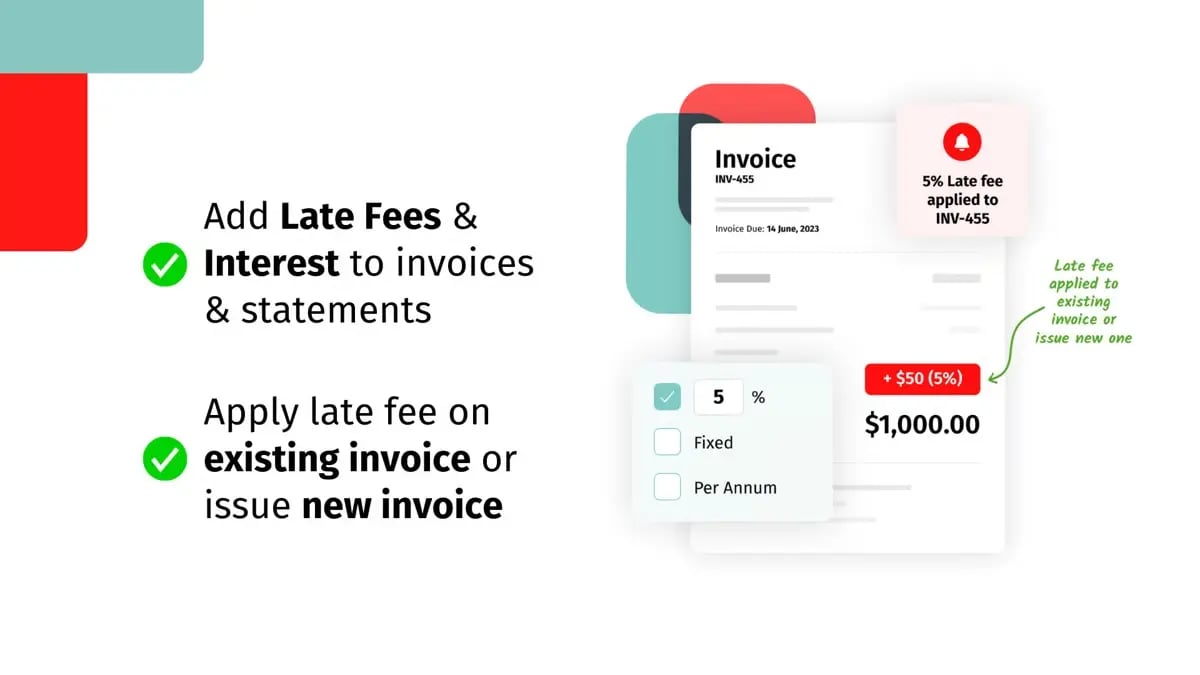
Paidnice is built explicitly for Xero and QuickBooks Online, with a dedicated integration page for each, and invoices sync in real time so Paidnice can evaluate every one against a team’s own rules.
Paidnice is enforcement-led rather than forecasting-led. Its differentiator is automatic late fees and compounding interest, including UK statutory interest indexed to the Bank of England base rate, alongside statements, payment plans, and escalation workflows. A named AR Insights and Reporting feature gives visibility into cash flow and expected payment dates, but it reads as reporting tied to that enforcement data rather than a dedicated forecasting engine.
Key features
- Configurable late fees, compounding interest, and prompt payment discounts by customer group or invoice tag
- UK statutory interest automatically indexed to the Bank of England base rate
- Multi-channel reminder sequences across email and SMS
- Automated statements with 30/60/90-day aging
- Escalation workflows including dispute letters
Pros
- Pricing is published directly on Paidnice’s own site rather than gated behind a sales quote, unusual among the tools in this comparison
- Reviewers consistently cite the automation of late fees and reminders as the standout feature, alongside responsive support
- Paidnice’s own product listing states customers reduce days sales outstanding by an average of 25%
- Winner of the 2025 Xero Global Small Business App of the Year award
Cons
- No dedicated cash flow forecasting module; visibility into future cash position is a byproduct of the enforcement data rather than a modeled forecast
- The smallest G2 review base in this comparison (13 reviews), so there is less independent evidence at scale than for other tools here
- Automatic late fees and statutory interest suit teams comfortable with an enforcement-first approach to collections, rather than a relationship-first one
Pricing
Paidnice offers a flat rate per organization regardless of team size and a free trial available before committing.
What users say
Paidnice holds a 4.8/5 rating on G2 from 13 reviews, with reviewers most often citing the automation of late fees and reminders alongside consistently responsive support.
5. Invoiced
Best for: Medium to enterprise B2B teams wanting billing, collections, and forecasting bundled with broad ERP reach beyond Xero.
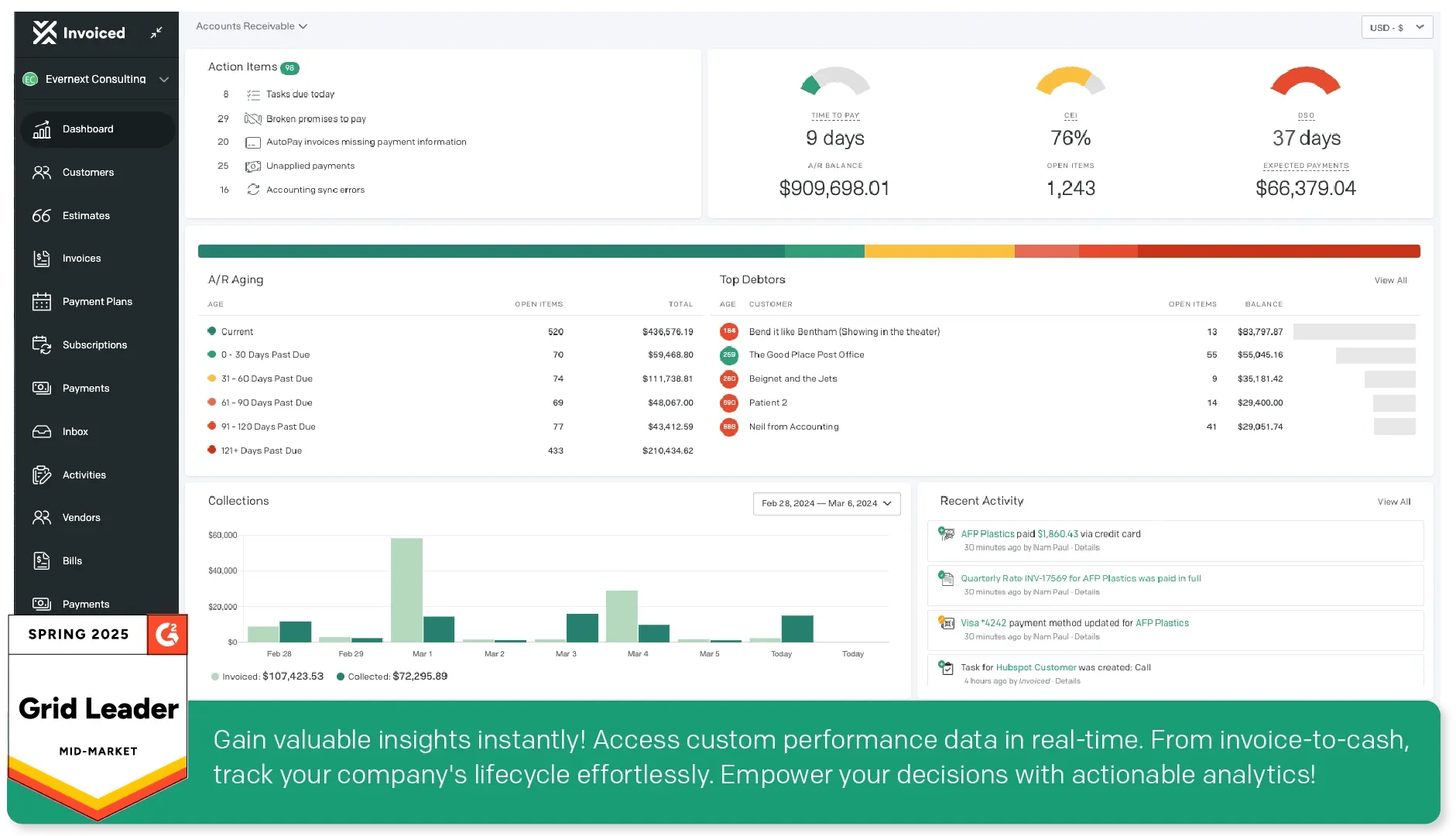
Invoiced, now operating as Invoiced by Flywire following its acquisition, has a dedicated Xero integration covering automated invoicing, custom fields, payment plans, white-labeled email, and chasing synced directly with Xero, alongside native integrations for NetSuite, Sage Intacct, Microsoft Dynamics, and QuickBooks.
Invoiced models and acts. Its own feature set includes rolling forecasts, reforecasting, and forecast comparison among its reporting capabilities, built on its own billing, collections, and cash application data, alongside AI-flagged at-risk customers. That makes Invoiced a third tool in this comparison, alongside Kolleno and Upflow, confirmed to model and act rather than only read the ledger.
Key features
- Native ERP integrations spanning NetSuite, Sage Intacct, Microsoft Dynamics, QuickBooks, and Xero
- Rolling cash flow forecasts and at-risk customer prediction
- Customer self-service payment portal
- Automated dunning and chasing cadences by customer segment
Pros
- Reviewers on G2 most often cite ease of use and the strength of the customer support team
- ERP reach beyond Xero suits a team that also runs NetSuite, Sage Intacct, or Dynamics
- The self-service customer portal doesn't require a password to log in, which reviewers credit with reducing friction to get paid
- Rolling forecasts and reforecasting are named, built-in reporting capabilities
Cons
- Several recent reviews describe pricing changes and slower support response times since the Flywire acquisition, worth weighing against Invoiced’s earlier reputation on support
- Some reviewers report the payment sync from Sage Intacct can get stuck and needs improvement
- Reporting customization is a recurring theme in reviewer feedback, with some wanting more flexibility to build custom views
Pricing
Invoiced doesn't publish plan pricing; the pricing page routes to a demo request, and evaluation starts from there.
What users say
Invoiced holds a 4.5/5 rating on G2 from 414 reviews, the largest review base in this comparison. Praise centers on ease of use and the self-service customer portal; recent reviews flag support responsiveness and pricing changes since the acquisition.
6. Upflow
Best for: Scaling B2B and SaaS companies wanting the most analytics-led AR dashboards, including a named cash-forecast view.
.webp?width=2048&height=1195&name=upflow%20dashboard%20(1).webp)
Upflow has a confirmed native Xero connector, alongside NetSuite, QuickBooks, Sage Intacct, and Chargebee, and its own case studies point to customers like Front, Lattice, and Productboard.
Upflow models and acts. Its G2 listing and marketing describe cash forecasts, billing cohort analysis, and aging reports inside its analytics dashboard, generated alongside its own automated collections workflows and cash application. That makes Upflow the second tool in this comparison, alongside Kolleno, confirmed to model and act rather than sit read-only against the ledger.
Key features
- AR analytics dashboards covering days sales outstanding (DSO), aging, and billing cohorts
- Automated and segmented collections workflows
- Branded customer payment portal
- AI-suggested "promise to pay" tagging drawn from customer email replies
Pros
- Reviewers on G2 most often cite ease of use and the depth of the analytics dashboards
- AI-suggested promise-to-pay tagging turns customer replies into a forecasting input automatically, a differentiator among the tools compared here
- Reviewers specifically praise the AI-generated summary of customer interaction timelines for visibility into account history
- The credit-memo reconciliation view is called out by reviewers for meaningfully cutting time spent on manual reconciliation
Cons
- Pricing isn’t published, so a team wanting a quick, self-serve estimate will need to request a quote
- Reviewers note reporting can feel rigid, including limited ability to edit custom fields within exported reports
- Some reviewers flag gaps in international automatic debit options and deeper integration with tools like Chargebee
Pricing
Upflow doesn't publish plan pricing publicly; a free Discover plan is available to try the analytics dashboard before a fuller conversation.
What users say
Upflow holds a 4.8/5 rating on G2 from 233 reviews. Reviewers most often cite ease of use, the quality of automated reminders, and responsive customer support, with the analytics dashboards singled out as the platform’s strongest feature.
Which cash flow forecasting tool fits your Xero setup
The right tool depends on whether the forecasting problem here is really a modeling problem or a receivables problem.
|
Your situation |
Recommended |
Why |
|---|---|---|
|
Late-paying customers are why your Xero-synced forecast keeps missing |
Chaser |
The only option in this comparison built to close the gap in forecasting |
|
You need multi-year FP&A modeling, full three-way statements, or multi-entity consolidation |
Look outside this list: Fathom or Float |
These needs sit outside all six tools compared here, stated plainly rather than forcing a fit |
|
You want the broader field of cash flow forecasting software, not tools built specifically around Xero |
Broader comparison beyond Xero-specific fit |
|
|
You want the fuller picture of AR management on Xero beyond forecasting alone |
Covers AR management more broadly for Xero-based teams |
A team already running Chaser gets the deepest view here, because the forecast and the collections activity that improves it live in the same platform. A team whose forecasting problem is about modeling depth will be better served by a dedicated FP&A platform than by any of the six tools in this comparison, since none of them replace that category outright.
For a team wanting the wider field of Xero-agnostic cash flow forecasting software, the general roundup above covers that ground. For a team wanting the fuller AR picture on Xero beyond forecasting alone, the Xero AR guide goes deeper on the surrounding process.