


















.svg.png?height=48&name=Zoho_CRM_(application).svg.png)







A payment just hit the bank, no remittance advice attached. The payer name looks familiar, but the amount does not match any single open invoice. Is it a partial payment, a bundle across multiple invoices, or a credit note netted off somewhere. A quick scan of emails shows the customer asked for a copy invoice last week, so the money might relate to that. Then another payment arrives from the same customer, different amount, still no reference. Now multiply that by dozens of customers across the week.
This is how a cash application becomes detective work. Until each payment is matched in the ERP, the ledger stays wrong, paid customers still look overdue, and unapplied cash sits in limbo. Finance teams try familiar fixes: “include invoice numbers”, Excel matching, and QuickBooks workarounds. Customers ignore requests, manual matching does not scale, and workarounds add complexity.
Cash application automation works best when it prevents mystery payments, not when it guesses faster after the fact.
This guide covers what the cash application process is, why manual methods keep failing, and a three part framework that makes automation realistic. The goal is a strategic model that guides decisions, not a rigid tool by tool checklist.
What is the cash application process?
Cash application is the process of matching incoming customer payments to outstanding invoices in an accounts receivable. It’s a critical step in the broader accounts receivable process.
.webp?width=3532&height=2016&name=Customers%20(1).webp)
The core job is to identify who paid, which invoices the payment relates to, and then post the payment correctly in the ERP so customer balances and reporting are accurate.
Accurate cash application keeps the books and your balance sheet aligned to actual cash position. It supports cash flow forecasting and working capital decisions because the ledger reflects what has been paid and what remains outstanding. It also improves collections focus. Time can be spent on genuinely delinquent accounts instead of customers that already paid but are still showing as overdue.
The traditional challenge is that payments often arrive without clear reference to which invoices they cover. That creates manual detective work matching amounts, customer names, invoice dates, and partial payments. The automation framework below is designed to prevent that scenario, not just make the matching phase quicker.
Why manual cash application keeps failing (and what's missing)
Most finance teams try to fix cash applications by improving post payment tools. That usually means refining matching logic, adding spreadsheets, or searching for better ways to allocate payments once they arrive.
The real issue is simpler. Mystery payments should not exist in the first place. The question is not only how to match payments faster. The question is how to prevent mismatched payments.
Manual cash application fails because the process relies on missing data. When the payment arrives without remittance advice, the AR function is forced to reconstruct intent after the fact. That reconstruction is slow, error prone, and hard to standardise. Three common approaches show the pattern clearly.
Manual matching in spreadsheets and Excel
Spreadsheets are often the default fallback. AR teams export payments from the bank feed or payment processor and track them in a separate sheet. Notes get added during investigation, then invoices get marked as paid in the ERP once a match is decided. In smaller volumes, this is manageable. At scale, it becomes a treadmill.
It fails because it is time consuming, especially when payments are split across multiple invoices or arrive in tranches. It also increases the risk of misapplication. A wrong allocation can cascade into incorrect statements, unnecessary chasers, and customer disputes.
Spreadsheets do not sync back to the ERP, so the work becomes double entry. Data has to be retyped, copied, or manually posted, which adds even more risk. What is missing is a prevention mechanism.
Spreadsheets clean up the mess after it happens. Effective accounts receivable management requires preventing these reconciliation challenges at the source.
Requesting customers include invoice numbers on payments
The next approach is to ask customers to include invoice numbers on bank transfers and remittances. Invoices include a line requesting reference details. Reminder emails repeat the instruction. Sometimes the request is added to payment terms or credit control templates.
It fails because there is no enforcement mechanism. Some customers comply, many do not. Even customers with good intentions forget. Others pay through approval chains where invoice numbers are stripped out or replaced by internal references.
Payments still arrive without reliable references, especially when multiple invoices are paid at once. What is missing is process design. Voluntary compliance rarely holds at scale. Data collection has to be embedded in the payment path.
ERP workarounds in QuickBooks, and similar systems
When spreadsheets and requests do not solve the issue, teams often build workarounds in the accounting platform. That can include split deposits, dummy invoices, journal entries, or clearing accounts to temporarily hold unapplied cash. These techniques can help post payments in some scenarios, but they do not remove investigation.
It fails because many ERPs are not designed for complex one to many matching. A single payment covering multiple invoices can require clunky multi step allocation. Partial payments add more complexity. Credit notes, fees, and deductions require manual decisions at each payment. The workaround becomes another process layer that still depends on the same missing information. What is missing is integration and automation that handles complexity automatically, not through manual patches.
Across all three failed approaches, the same pattern shows up. Mystery payments are treated as inevitable, then the organisation invests in faster detective work. The better approach is to prevent the mystery from happening. That is the shift that makes cash application automation realistic. The next section covers three principles that move cash application from reactive matching to proactive prevention.
The three part framework for effective cash application automation
Cash application automation works best when it reduces the need for matching rather than improving matching alone. The framework below is built around prevention. Each principle tackles a root cause of reconciliation headaches and makes the automation layer far more reliable.
The three principles are:
- Shift the burden of data collection to the source.
- Eliminate manual data transfer between systems.
- Design processes customers cannot bypass.
Together, these principles reduce missing remittance advice, cut double entry, and replace voluntary compliance with enforced workflow. That is what unlocks automated cash applications rather than assisted matching.
1. Shift the burden of data collection to the source
A good cash application starts before the payment arrives. Payment data should be captured where the payment decision happens, which is on the customer side. It should not be reconstructed later by the AR team. In a well designed process, customers select which invoices are being paid, and the system captures that selection automatically. Every payment arrives with complete remittance data. Mystery payments largely disappear.
This matters because customers know which invoices are being paid. AR specialists do not. Without remittance, matching is guesswork. Guessing creates delays, errors, and customer friction. It compounds at scale because a small percentage of ambiguous payments can consume the majority of time.
When you capture invoice intent upfront, the payment can be applied immediately, collections activity becomes more accurate, reporting improves and ultimately, this reduces days sales outstanding.
One of the reasons payments go unpaid or get delayed is missing information and payment details on the invoice itself. Inga Schibisted, Growth Marketing Manager, Partnerships at Chaser, puts it clearly: “One of the most common reasons for invoices to go unpaid is the missing information and payment details on the invoice itself, including these details makes it even easier for customers to pay you on time and avoid them having to come back to you with queries or putting off making payments.”
Most approaches miss this principle because they assume customers will not provide data voluntarily. Then the response becomes better detective tools, such as AI matching, pattern recognition, or rules that infer intent. That treats the symptom.
It does not treat the cause. Manual requests fail because there is no enforcement. If the payment path does not require invoice data, the information will remain inconsistent. While AI and automation in receivables can help with matching, prevention eliminates the need for guessing entirely.
You can recognize this principle in practice by looking at the payment journey. The payment process should require invoice selection before payment is accepted. The customer should see outstanding invoices and select which ones to pay. The system should generate remittance data automatically from that selection. AR should receive payment with complete reference information attached.
This is why solutions like Chaser’s Payment Portal shift data collection to the customer at the point of payment. The portal lets customers select invoices before submitting payment and creates remittance advice automatically as the payment is processed.
The benefit is not faster guessing. The benefit is eliminating mystery payments by capturing accurate data at the source. The core principle remains the same regardless of tool choice. Capture invoice intent before the payment lands.
Practical moves that support this principle include:
- Include a payment link on invoices and reminders that routes customers to a view of outstanding invoices.
- Present invoice level detail in the payment journey rather than only a total balance.
- Use structured payment instructions that encourage correct referencing, even for bank transfers.
The goal is consistent invoice level remittance data, not occasional compliance.
2. Eliminate manual data transfer between systems
Automation breaks down when you have to move data by hand. Good cash application automation means payment data flows from the capture point into the ERP without human intervention. There should be no spreadsheet intermediaries and no copy paste between systems. Payments should post to the correct invoices in real time, or close to it, and invoices should be marked as paid automatically.
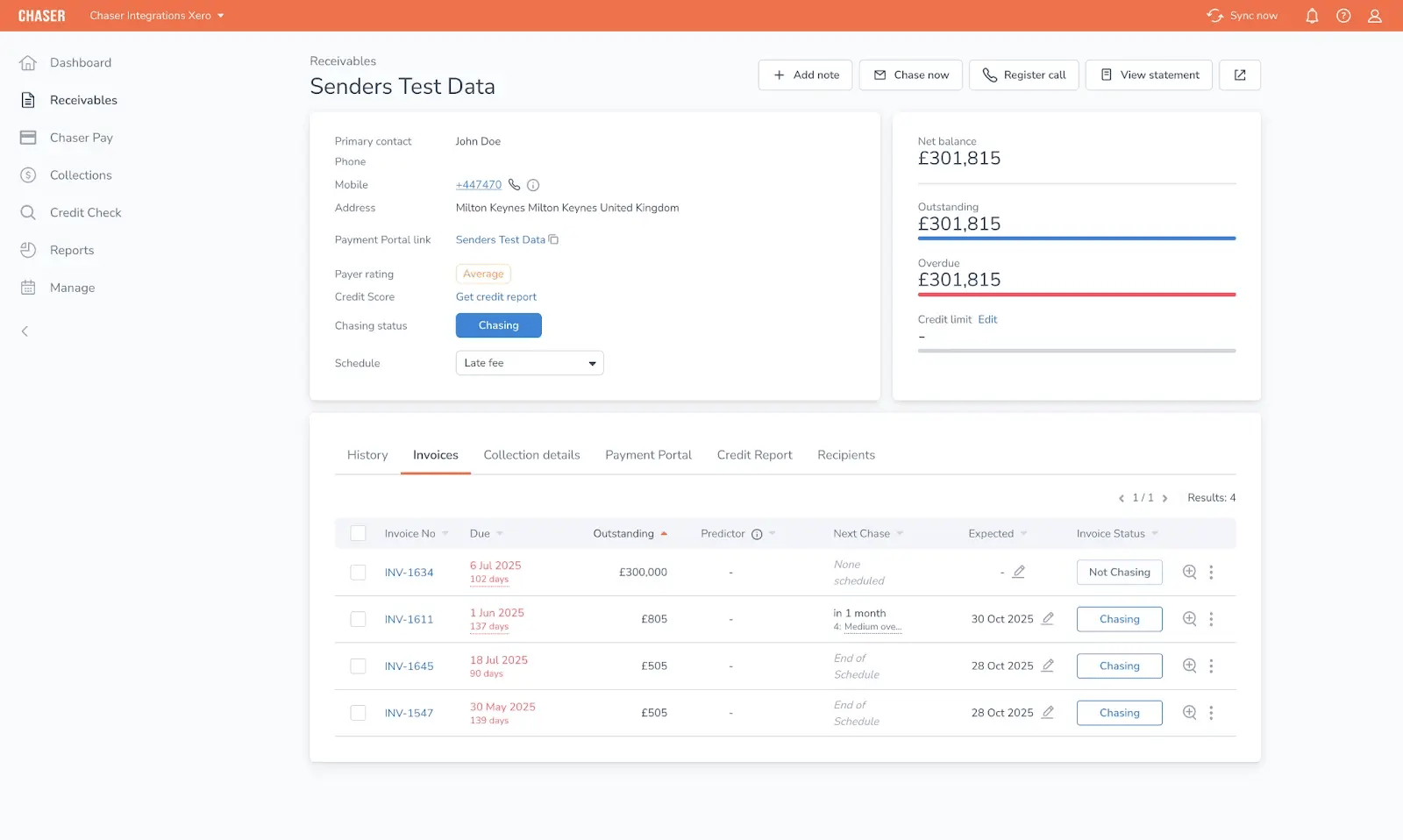
This matters because manual transfer creates delays and errors. Every human touchpoint adds failure risk. Manual posting can become the hidden cost of collections because time spent on data movement is time not spent on managing disputes, improving terms, or reducing delinquency. When data transfer is automated, the ledger stays up to date, the collections queue stays cleaner, and reporting becomes more trustworthy.
Most approaches miss this principle because tools are disconnected. Bank feeds sit in one system, payment portals sit in another, and the ERP is the system of record. When the tools do not integrate, AR becomes the integration layer.
That often shows up as manual reconciliation between systems. ERP workarounds still require manual decisions and do not remove the transfer burden. Systems like QuickBooks can handle many cases, but complex one to many scenarios still benefit from native automation that applies payments cleanly.
This principle can be recognised in practice through a simple test. A payment captured in one system should appear in the ERP automatically. The relevant invoices should be marked as paid without AR intervention. There should be a single source of truth, not two parallel records that need reconciling. Sync should be timely. A batch update that arrives days later does not solve cash visibility issues.
This is why Chaser’s native QuickBooks and other ERP integrations automatically mark invoices as paid when payments are processed through the Payment Portal. Two way sync ensures that payment data flows directly into the accounting system and auto posts to the correct invoices.
The benefit is eliminating manual matching and manual posting, not just speeding it up, which ultimately improves your cash conversion cycle.
Practical moves that support this principle include:
- Audit the current tool stack and list where payments are first captured, where remittance is stored, and where posting happens.
- Remove spreadsheet steps wherever possible by prioritising systems that integrate natively.
- Use automation rules that post standard scenarios automatically and route exceptions to a review queue.
The goal is a clean flow from payment capture to ERP posting with minimal human handling.
3. Design processes customers can't bypass
The easiest path for customers to pay should also be the path that provides complete payment data. Cash application fails when customers can pay in ways that bypass data collection. Asking for invoice numbers on payments does not work when the payment journey does not require it.
A better approach is to build compliance into the workflow. The payment process should require invoice selection before payment is accepted. The customer should not be able to skip the data collection step.
This matters because voluntary compliance fails at scale. Requests like “please include invoice number on payment” are often ignored, not because customers are hostile, but because payment processes are messy. Approvals, shared inboxes, and multiple payers break good intentions. Without an enforcement mechanism, the organisation becomes dependent on customer cooperation. That creates variability, which kills automation.
A proactive approach is linked to faster payment outcomes. Amaya Woods, Head of Marketing at Chaser, explains: “Businesses who have adopted a proactive approach to prevent late payments are three times more likely to be paid before that invoice due date.” Even without focusing on the statistic, the mechanism is clear. Proactive design reduces friction and reduces reasons for delay. It also reduces reconciliation ambiguity.
Most approaches miss this principle because they assume good intentions translate to consistent behaviour. Process design shapes behaviour more than requests do. Manual processes cannot enforce data collection. Automated workflows can. If the primary payment method makes it easier to pay correctly than to pay incorrectly, behaviour shifts naturally.
This principle can be recognised in practice by looking for bypass routes. Can a customer complete payment without providing invoice data? Can the customer send a lump sum without a reference. Does the process guide the customer through required steps? Is there any “skip” option? Data collection should happen inline with payment, not as a separate step that can be forgotten.
This is why Chaser’s payment portal requires invoice selection as part of the payment workflow. Customers see outstanding invoices and must select which to pay before proceeding. Enforcement happens through workflow design rather than manual follow up. The practical principle is broader than any single tool. Build a payment path that makes compliance automatic.
Practical moves that support this principle include:
- Make the preferred payment method the easiest method, with a one click path from invoice or reminder to payment.
- Present outstanding invoices clearly and require selection to proceed.
- Offer multiple payment options within the controlled flow to reduce the temptation to bypass.
The goal is consistent remittance data through a payment process customers naturally use.
How Chaser helps prevent cash application reconciliation headaches before they start
Chaser helps you prevent problems before they start rather than post payment reconciliation. Many cash application tools focus on matching payments after they land, often using AI to infer which invoices apply. Prevention focuses on capturing invoice intent at the source so matching becomes a simple posting event rather than an investigation.
Chaser’s Payment Portal captures invoice data during the payment journey. That supports the first principle, shifting data collection to the source. Chaser also integrates with accounting platforms so payment data flows into the ERP.
That supports the second principle, eliminating manual transfer. The portal workflow requires invoice selection, which supports the third principle, building compliance into the process design.
.webp?width=1134&height=1600&name=payment%20portal%20(1).webp)
A realistic caveat still applies. Payment portals work best for businesses with recurring customers that can adopt a consistent payment method. One off transactions or customers with locked procurement processes may still pay outside the portal, which can require traditional reconciliation. The value comes from shifting the majority of payments into a controlled path so automation handles the bulk of volume and manual effort is reserved for exceptions.
Capture payment data at the source with Chaser’s payment portal
The principle enabled here is capturing payment data where the payment decision happens, on the customer side.
Chaser’s Payment Portal shows customers outstanding invoices in one place. Customers select the invoices being paid before submitting payment. That selection creates invoice level remittance data automatically as the payment is processed. The payment arrives with the context needed for accurate posting.
The outcome is fewer mystery payments. Every payment comes with invoice reference data, which eliminates the manual detective work that typically sits between the bank feed and the ERP.
Eliminate data transfer with Chaser’s integration with the native ERP
The principle enabled here is automatic data flow from the capture point into the ERP without human intervention.
Chaser integrates with accounting systems such as QuickBooks, and also supports Sage 200 in relevant use cases. Payment data flows from the Payment Portal into the accounting system so invoices can be marked as paid automatically. Two way sync supports real time accuracy by keeping invoice status aligned between systems.
The outcome is less manual posting. Payments reconcile to the correct invoices without spreadsheet steps and without copy paste. This creates a cleaner single source of truth across systems.
Enforce compliance through Chaser’s automated workflow design
The principle enabled here is making the easiest payment path the same path that provides complete data.
The payment workflow requires invoice selection before payment can be completed. Customers cannot skip the invoice selection step, so remittance data is captured inline with payment rather than requested separately. The process guides the customer through the required steps, which creates consistent behaviour without manual follow up.
The outcome is higher data quality and more consistent cash application. Data collection becomes part of the payment experience, which supports automation across a recurring customer base.
Here’s how businesses have achieved success with Chaser
The Community Energy Scheme faced a manual matching workflow driven by spreadsheets and repetitive data entry. The Payment Portal captured payments at the source and the integration into Sage 200 reduced manual transfer.
The result was £18k in monthly payments captured through the portal with automatic sync into Sage 200, removing the need for manual posting and spreadsheet matching. Community Energy Scheme case study:
TaxAssist Accountants dealt with heavy matching complexity across multiple client accounts, creating a high volume of ambiguous payment allocation work. A centralized portal approach supported invoice selection and consistent payment data capture. The result was £20k recovered in 30 minutes without manual matching.
Glaze Digital needed real time visibility into invoice status without manual data entry across client receivables. Two way Xero sync supported real time invoice data flow between systems, which reduced manual posting and improved operational visibility.